> ## Documentation Index
> Fetch the complete documentation index at: https://docs.lumi.new/llms.txt
> Use this file to discover all available pages before exploring further.
# Databases
> Managing your web's data.
In Lumi, **data** is the structured information that powers the dynamic functionality of your app, including users, content, orders, and more. This information is organized within **tables**, which function similarly to a database or spreadsheet. Each table consists of **fields** (columns), and each field holds a specific type of information.
## Working with data
### How to add database to your project.
Generally, Lumi will automatically analyze your needs and add this function when a database is required. You can also emphasize it in the prompt, such as "Create an orders management system with a database to store orders data."
### Manually add a record
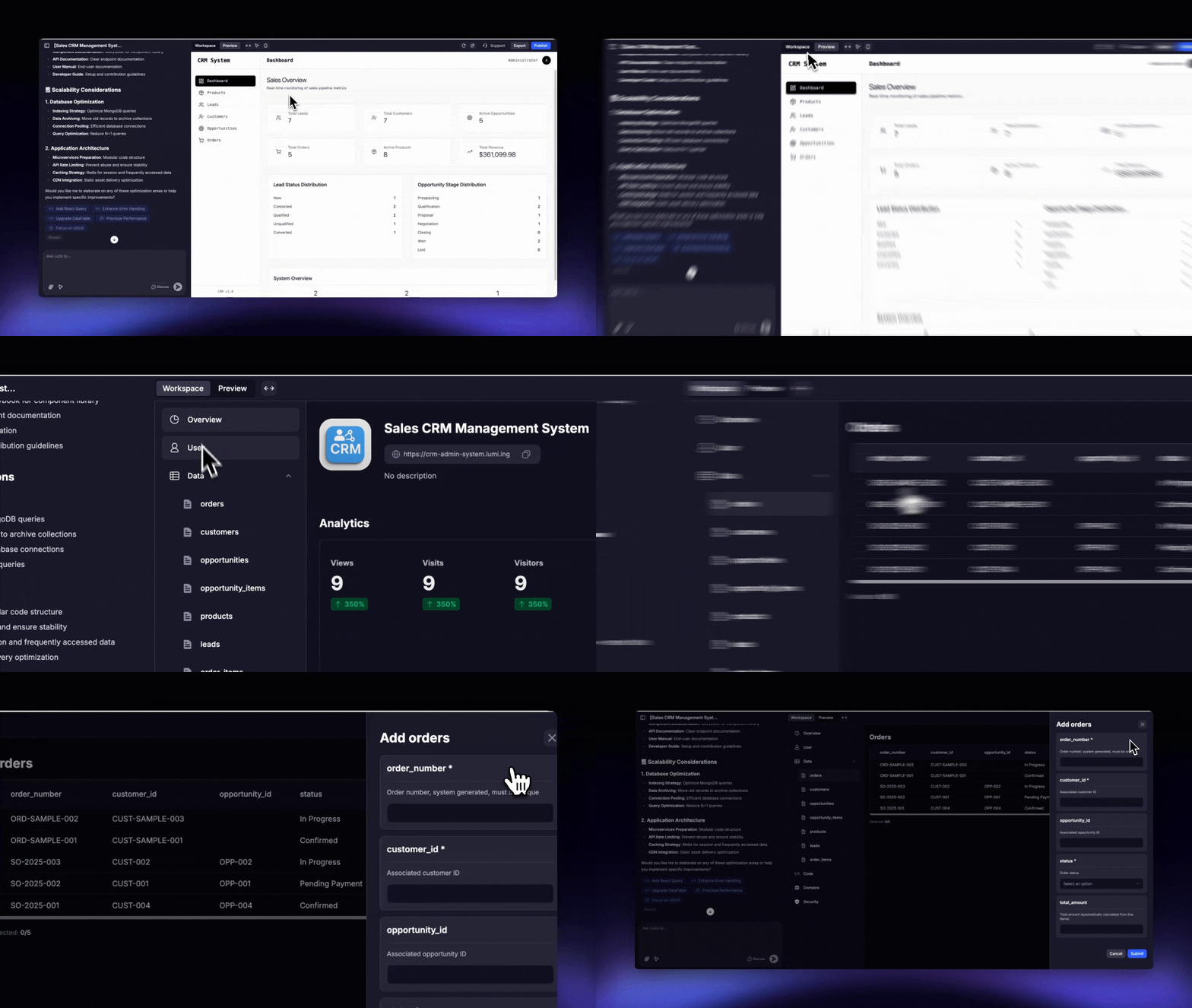 Go to Workspace → Data and select the table you want to add data to.
Click the “Add” button and fill in the fields for the new record.
**Tip:** For a more user-friendly experience, you can ask the chat to build a form within your app, allowing you to add new items dynamically.
### Manually edit a record
Go to Workspace → Data and select the table you want to add data to.
Click the “Add” button and fill in the fields for the new record.
**Tip:** For a more user-friendly experience, you can ask the chat to build a form within your app, allowing you to add new items dynamically.
### Manually edit a record
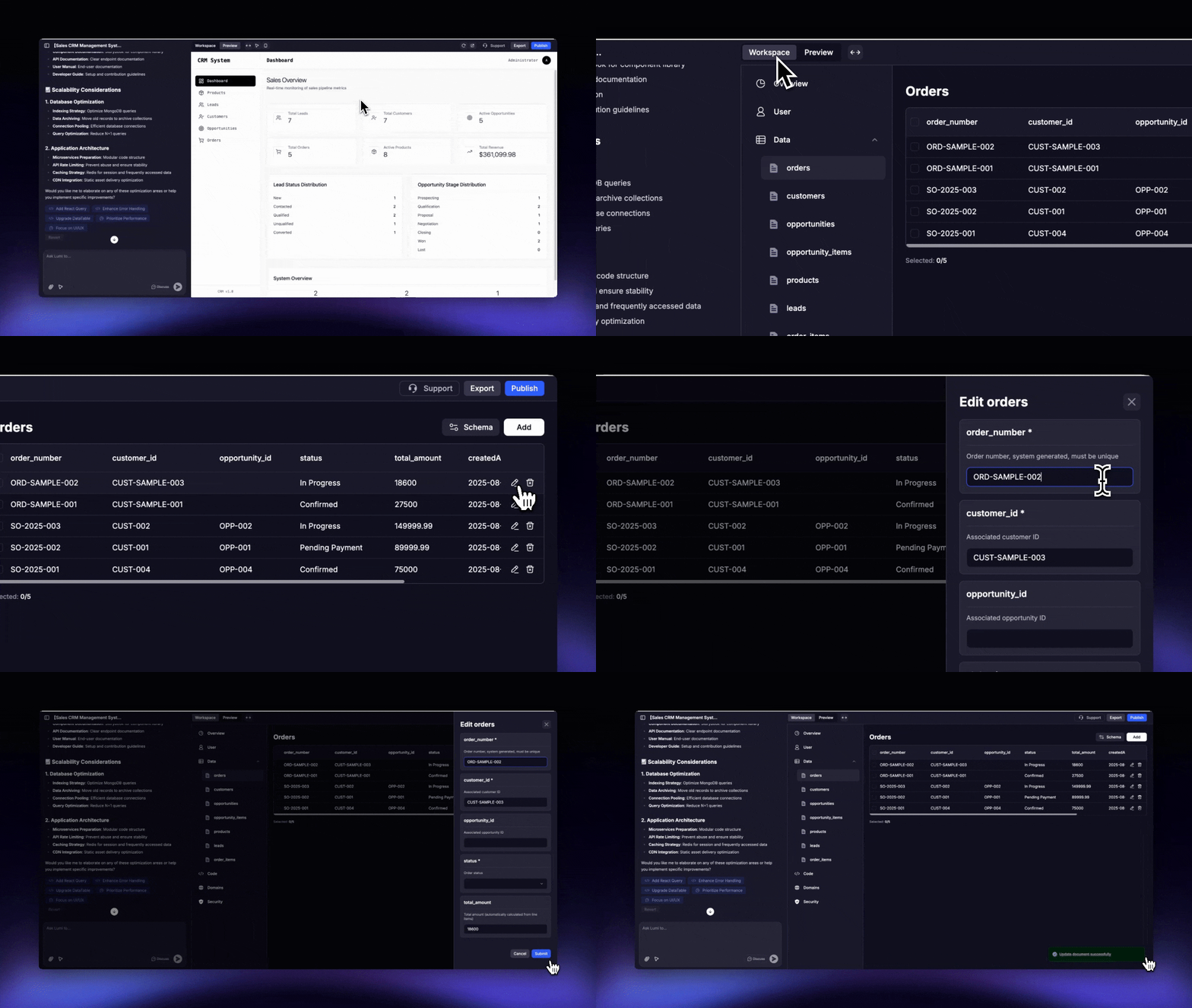 Go to Workspace → Data and select the table containing the record you wish to edit.
Click the ✒️ Pen icon for the desired record and make your changes.
### Deleting and batch operations
* To delete a single record
Go to Workspace → Data and select the table containing the record you wish to edit.
Click the ✒️ Pen icon for the desired record and make your changes.
### Deleting and batch operations
* To delete a single record
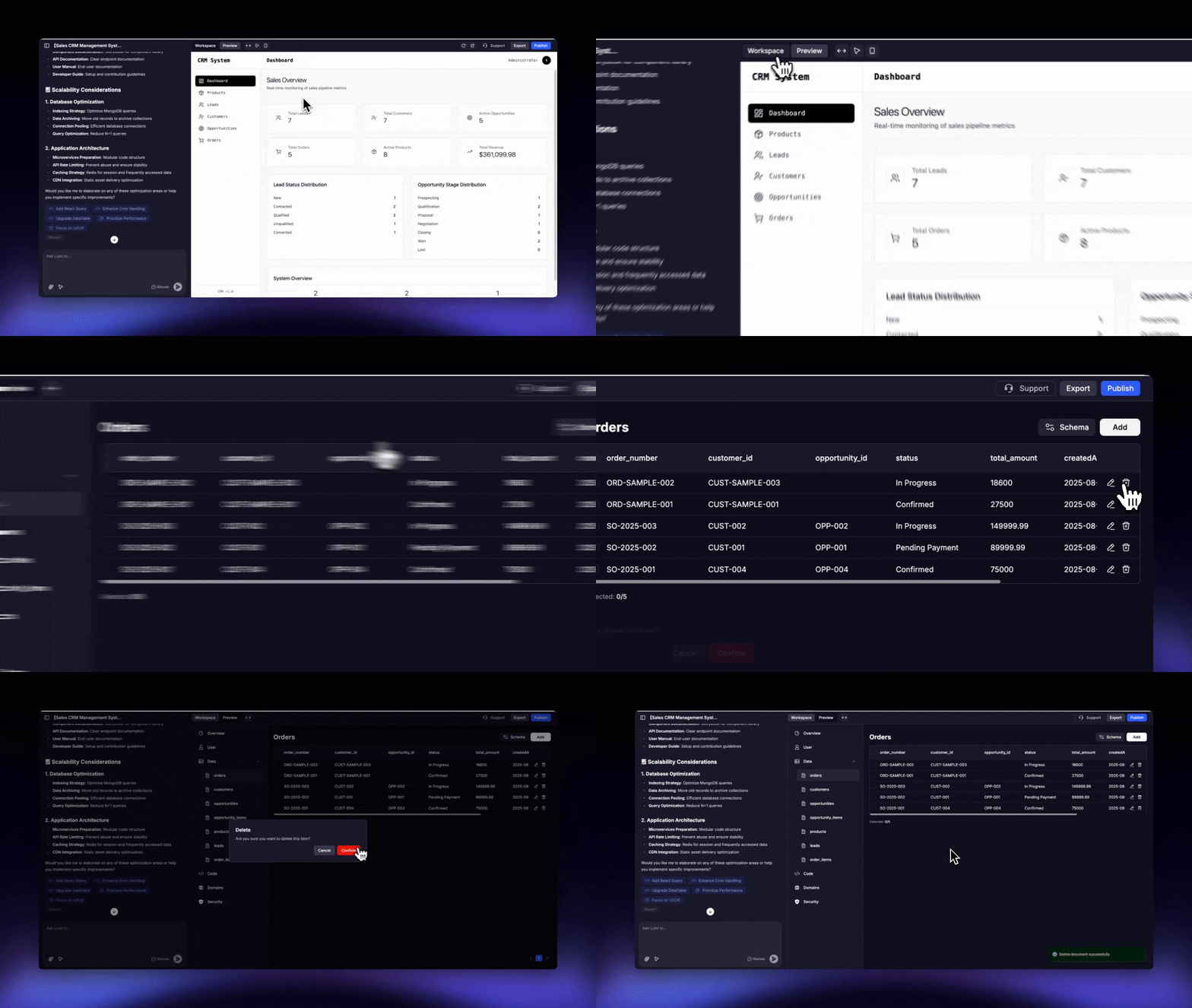 Go to Workspace → Data and select the table containing the record you wish to delete.
Click the 🗑 Trash Bin icon for the record you want to delete.
* To make a batch deletion
Go to Workspace → Data and select the table containing the record you wish to delete.
Click the 🗑 Trash Bin icon for the record you want to delete.
* To make a batch deletion
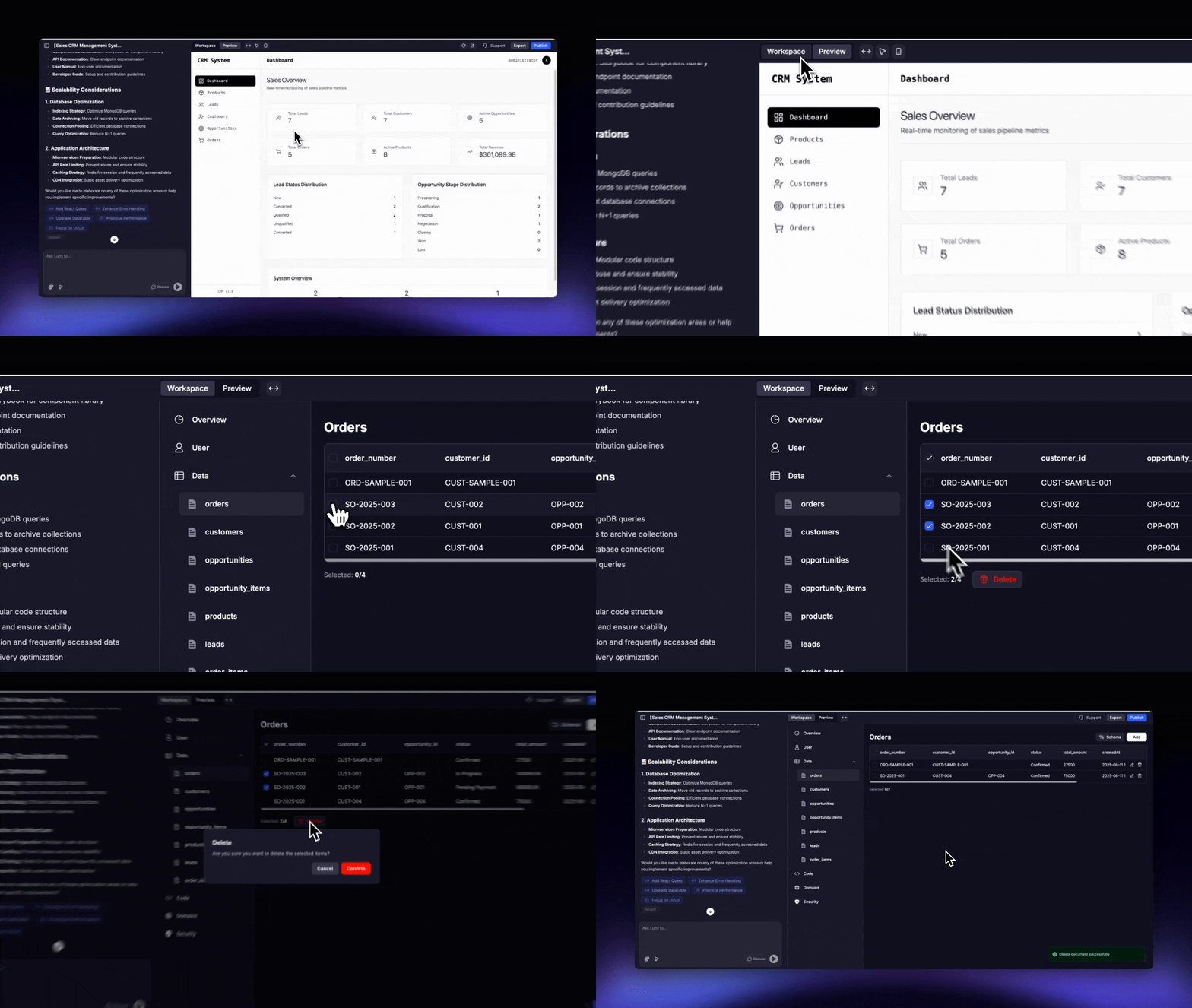 Go to Workspace → Data and select the table from which you want to delete records.
Select the checkboxes for the records you want to remove, then click the "Delete" button that appears near the selection count.
**Warning:** Be careful that deletion is irreversible
## Supported field types
1. Basic Data Types
* **String**: A UTF - 8 encoded string used to store text data.
* **Integer**: Includes 32 - bit and 64 - bit integers for storing integer values.
* **Double**: 64 - bit floating - point numbers for storing decimal numbers or large numbers.
* **Boolean**: Stores logical values true or false.
* **Null**: Represents a null value or a non-existent field.
2. Complex Data Types
* **Array**: An ordered collection of elements that can contain different types of data.
* **Object (Embedded Document)**: A collection of key-value pairs that supports nested structures.
* **Date**: Stores date and time represented as UTC milliseconds.
3. Special Data Types
* **ObjectId**: A 12 - byte unique identifier, used by default for the \_id field of a document.
* **Binary Data**: Stores binary data (such as images, files).
* **Regular Expression**: Stores regular expressions for text matching.
* **JavaScript**: Supports storing and executing JavaScript code.
4. Extended Data Types
* **Timestamp**: A 64 - bit timestamp where the first 32 bits are seconds and the last 32 bits are nanoseconds, used to record operation times.
* **Decimal128**: A 128-bit high-precision decimal number, suitable for financial calculations.
* **GeoJSON**: Stores geospatial data.
## Security and table premissions
Each table includes its own security settings to control data access:
* **Read Access:** Defines who is permitted to view the records within the table.
* **Write/Delete Access:** Determines who can create, update, or delete records.
Go to Workspace → Data and select the table from which you want to delete records.
Select the checkboxes for the records you want to remove, then click the "Delete" button that appears near the selection count.
**Warning:** Be careful that deletion is irreversible
## Supported field types
1. Basic Data Types
* **String**: A UTF - 8 encoded string used to store text data.
* **Integer**: Includes 32 - bit and 64 - bit integers for storing integer values.
* **Double**: 64 - bit floating - point numbers for storing decimal numbers or large numbers.
* **Boolean**: Stores logical values true or false.
* **Null**: Represents a null value or a non-existent field.
2. Complex Data Types
* **Array**: An ordered collection of elements that can contain different types of data.
* **Object (Embedded Document)**: A collection of key-value pairs that supports nested structures.
* **Date**: Stores date and time represented as UTC milliseconds.
3. Special Data Types
* **ObjectId**: A 12 - byte unique identifier, used by default for the \_id field of a document.
* **Binary Data**: Stores binary data (such as images, files).
* **Regular Expression**: Stores regular expressions for text matching.
* **JavaScript**: Supports storing and executing JavaScript code.
4. Extended Data Types
* **Timestamp**: A 64 - bit timestamp where the first 32 bits are seconds and the last 32 bits are nanoseconds, used to record operation times.
* **Decimal128**: A 128-bit high-precision decimal number, suitable for financial calculations.
* **GeoJSON**: Stores geospatial data.
## Security and table premissions
Each table includes its own security settings to control data access:
* **Read Access:** Defines who is permitted to view the records within the table.
* **Write/Delete Access:** Determines who can create, update, or delete records.
.png?fit=max&auto=format&n=ynWgEA-zeP9dMZPg&q=85&s=ab5d3abaf0caa231d6382f8660faf92e)