> ## Documentation Index
> Fetch the complete documentation index at: https://docs.lumi.new/llms.txt
> Use this file to discover all available pages before exploring further.

# クイックスタート

> シンプルな言葉からフルスタックのウェブサイトまで。

Lumiでフルスタックのウェブサイトを作成するためのクイックスタートガイドへようこそ。

## ホームページ
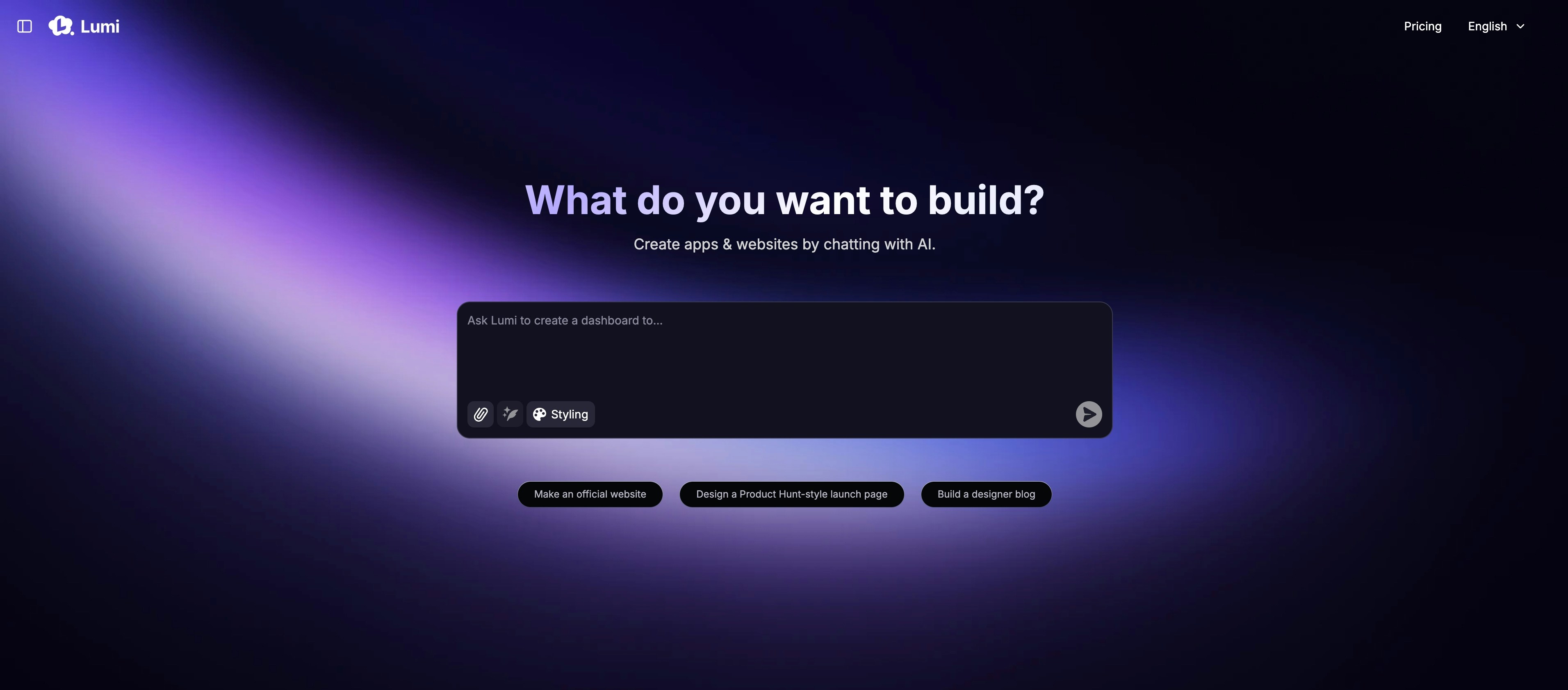
<img src="https://mintcdn.com/blockdance/ynWgEA-zeP9dMZPg/images/20250821-202133.jpeg?fit=max&auto=format&n=ynWgEA-zeP9dMZPg&q=85&s=97442ddf98e65bf43b19ba56f6c17969" alt="20250821 202133 Jpe" width="3824" height="1682" data-path="images/20250821-202133.jpeg" />

ホームページには主に以下のものが含まれています：

<Columns cols={2}>
  <Card title="プロンプトから始める" img="https://mintcdn.com/blockdance/ynWgEA-zeP9dMZPg/images/screenshot-20250825-154846.png?fit=max&auto=format&n=ynWgEA-zeP9dMZPg&q=85&s=e8fafb96d5faa0c0ec43a0a0dfdb5f05" width="1618" height="358" data-path="images/screenshot-20250825-154846.png">
    一つの説明的なプロンプトでプロジェクトを開始します。
  </Card>

  <Card title="テンプレートを使用する" img="https://mintcdn.com/blockdance/ynWgEA-zeP9dMZPg/images/screenshot-20250825-154857.png?fit=max&auto=format&n=ynWgEA-zeP9dMZPg&q=85&s=3a4d7d4389fbc89e96b9014357cb3e40" width="1336" height="98" data-path="images/screenshot-20250825-154857.png">
    厳選されたテンプレートコレクションから始めることで、開発を加速させます。
  </Card>

  <Card title="コミュニティを探索する" img="https://mintcdn.com/blockdance/ynWgEA-zeP9dMZPg/images/screenshot-20250825-155003.png?fit=max&auto=format&n=ynWgEA-zeP9dMZPg&q=85&s=2ea3bc083fb9a17998db34d75529494f" width="2970" height="1608" data-path="images/screenshot-20250825-155003.png">
    最新の作品や注目のセレクションを含む、すべての公開プロジェクトを閲覧します。
  </Card>

  <Card title="あなたのプロジェクトを見つける" img="https://mintcdn.com/blockdance/ynWgEA-zeP9dMZPg/images/screenshot-20250825-155110.png?fit=max&auto=format&n=ynWgEA-zeP9dMZPg&q=85&s=f069a5eb78bea9ca0f234038acd526eb" width="3824" height="1916" data-path="images/screenshot-20250825-155110.png">
    あなたが作成したすべてのプロジェクトを閲覧します。
  </Card>

  <Card title="アカウントを管理する" img="https://mintcdn.com/blockdance/ynWgEA-zeP9dMZPg/images/20250825-155323.jpeg?fit=max&auto=format&n=ynWgEA-zeP9dMZPg&q=85&s=611896281375aa724b885f4f28c03ea8" width="3822" height="1916" data-path="images/20250825-155323.jpeg">
    毎月のポイント残高を確認し、アカウント設定を調整します。
  </Card>

  <Card title="プランを調整する" img="https://mintcdn.com/blockdance/ynWgEA-zeP9dMZPg/images/20250825-155328.jpeg?fit=max&auto=format&n=ynWgEA-zeP9dMZPg&q=85&s=20009fa87973936ecda6032924e5754e" width="3822" height="1916" data-path="images/20250825-155328.jpeg">
    いつでもシームレスにサブスクリプションをアップグレードまたはダウングレードできます。
  </Card>
</Columns>

## プロジェクトページ

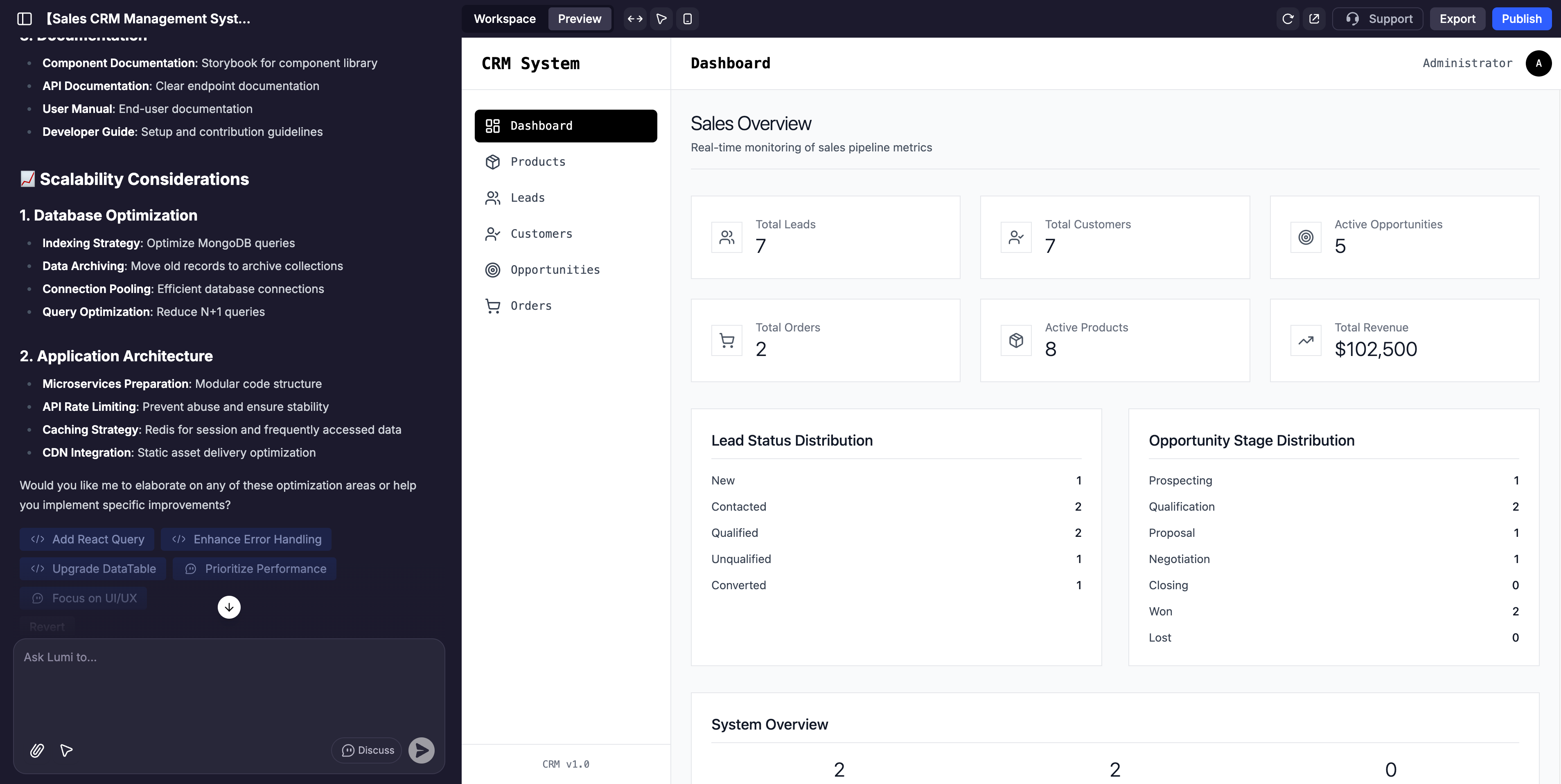
<img src="https://mintcdn.com/blockdance/ynWgEA-zeP9dMZPg/images/screenshot-20250825-160241.png?fit=max&auto=format&n=ynWgEA-zeP9dMZPg&q=85&s=a3ad5075591b6b38cc9c65aeb1b99c90" alt="Screenshot 20250825 160241 Pn" width="3814" height="1916" data-path="images/screenshot-20250825-160241.png" />

プロジェクトページは主に3つのセクションに分かれています：

<Columns cols={2}>
  <Card title="AIチャット" img="https://mintcdn.com/blockdance/ynWgEA-zeP9dMZPg/images/20250825-155522.jpeg?fit=max&auto=format&n=ynWgEA-zeP9dMZPg&q=85&s=d3231c7a4837f6899fe90820a7ad4f0e" width="3840" height="1916" data-path="images/20250825-155522.jpeg">
    これはLumiと対話するためのコマンドセンターです。指示を与えたり、変更を要求したり、アイデアをブレインストーミングしたり、アプリケーション開発をガイドしたりするために使用します。
  </Card>

  <Card title="プレビュー" img="https://mintcdn.com/blockdance/ynWgEA-zeP9dMZPg/images/20250825-155526.jpeg?fit=max&auto=format&n=ynWgEA-zeP9dMZPg&q=85&s=5eb8c40ef71ecde175fb7e9b367e2abd" width="3840" height="1916" data-path="images/20250825-155526.jpeg">
    これはあなたのウェブサイトのライブでインタラクティブ、そして完全にカスタマイズ可能なビューです。任意の要素をクリックしてその機能をテストしたり、ビジュアルエディタで直接調整したりできます。
  </Card>

  <Card title="ワークスペース" img="https://mintcdn.com/blockdance/ynWgEA-zeP9dMZPg/images/20250825-155529.jpeg?fit=max&auto=format&n=ynWgEA-zeP9dMZPg&q=85&s=8efc9e5f82cc14c5604ff02d1d8751a5" width="3840" height="1916" data-path="images/20250825-155529.jpeg">
    これには、ウェブサイトに関する情報、バックエンド機能、ツールの使用状況、ドメイン名、セキュリティなどが含まれます。
  </Card>
</Columns>

## AIチャット

AIチャットの主な機能は、自然言語のプロンプトを使用してアプリを構築し、改良することです。しかし、入力ボックスの下部には、さらに探求するための要素があります。
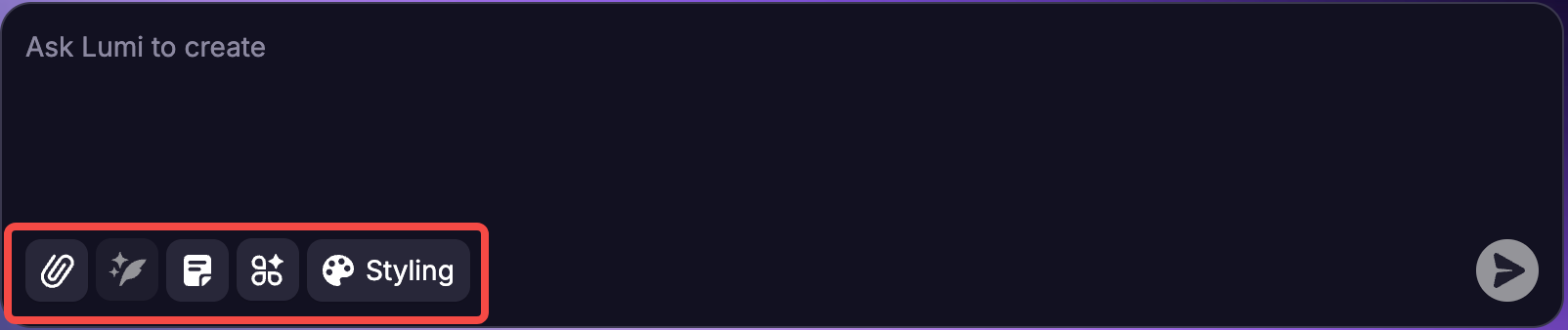
<img src="https://mintcdn.com/blockdance/yVzLgDWOMQWyvNCE/images/Result_2.png?fit=max&auto=format&n=yVzLgDWOMQWyvNCE&q=85&s=fbc0b4aeff6eb6c9b60e894f13bc99de" alt="Result 2 Pn" width="1604" height="338" data-path="images/Result_2.png" />

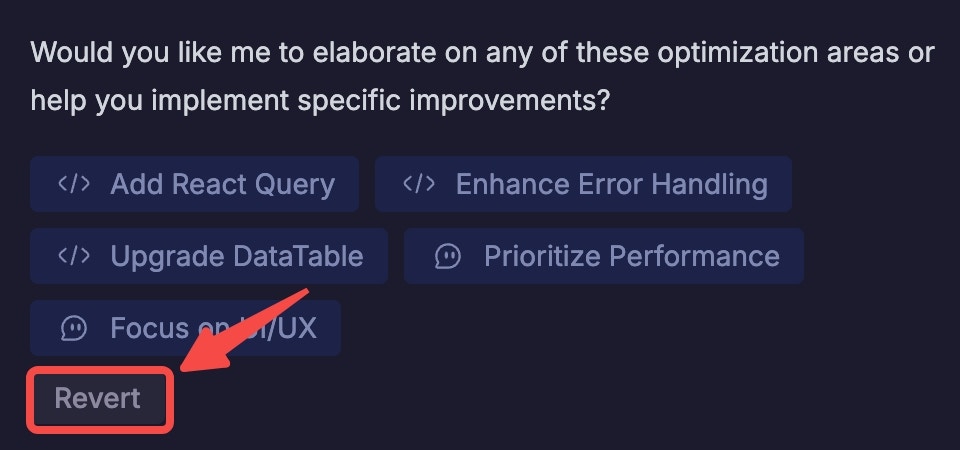
<u>注</u>：入力したすべてのプロンプトについて、チャットに戻っていつでも「Revert This」をクリックしてプロンプトを元に戻すことができます。リクエストの確認を求められ、その後アプリはその直前の状態に戻ります。

<Note>
  \*\*<u>注：</u>\*\*入力したすべてのプロンプトについて、チャットに戻っていつでも「Revert」をクリックしてプロンプトを元に戻すことができます。リクエストの確認を求められ、その後アプリはその直前の状態に戻ります。
  <img src="https://mintcdn.com/blockdance/yVzLgDWOMQWyvNCE/images/20250911-154652.jpeg?fit=max&auto=format&n=yVzLgDWOMQWyvNCE&q=85&s=5ba3ab426454dfb5f020b99d199d6f32" alt="20250911 154652 Jpe" width="960" height="450" data-path="images/20250911-154652.jpeg" />
</Note>

## 最初のアプリを構築する：ステップバイステップ

<Steps>
  <Step title="明確なプロンプトから始める">
    アプリのコア機能を簡単な言葉で説明します。

    例：

    ```mdx theme={null}
    Build a task manager for teams to assign, track, and complete tasks with progress reports.
    ```
  </Step>

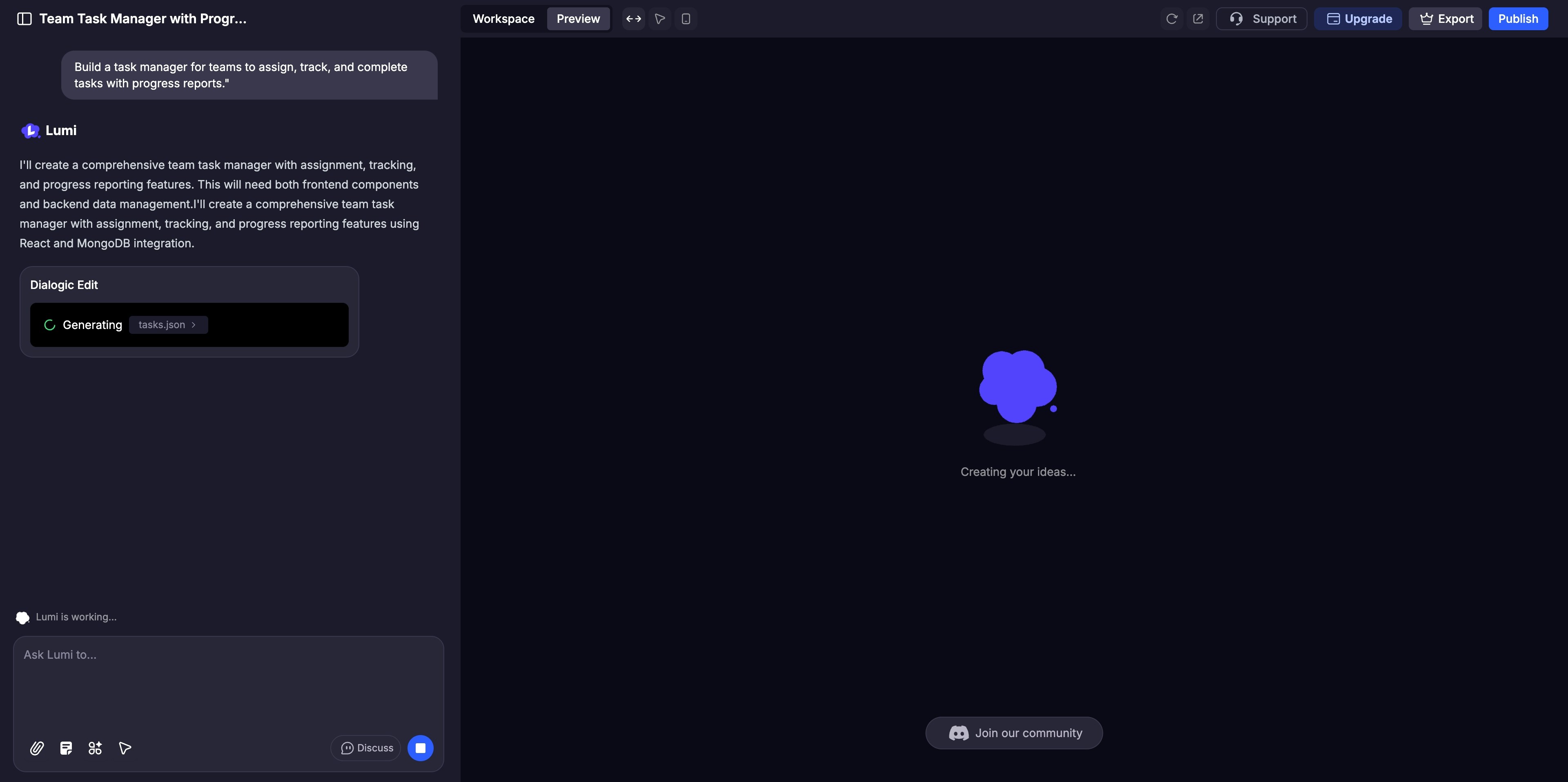
  <Step title="アプリを即座に生成する">
    Lumiはアプリのインターフェースとバックエンドを自動的に構築します。プレビューパネルでプロセスがライブで展開されるのを見ることができます。
    <img src="https://mintcdn.com/blockdance/yVzLgDWOMQWyvNCE/images/20250911-155051.jpeg?fit=max&auto=format&n=yVzLgDWOMQWyvNCE&q=85&s=e12430ce9ede5193248a77c6c56a4cfb" alt="20250911 155051 Jpe" width="3840" height="1916" data-path="images/20250911-155051.jpeg" />
  </Step>

  <Step title="改良とカスタマイズ">
    広範な調整にはAIチャットを、色やレイアウトなどの詳細な微調整には[ビジュアル編集](/ja/features/visual-edits)を使用します。実装前に複雑なロジックについてAIと協力するために[ディスカスモード](/ja/features/modes#discuss-mode)を有効にします。
  </Step>

  <Step title="徹底的にテストする">
    プレビューパネルでユーザーと同じようにウェブサイトを操作し、すべての機能をクリックして完璧に機能することを確認します。
  </Step>

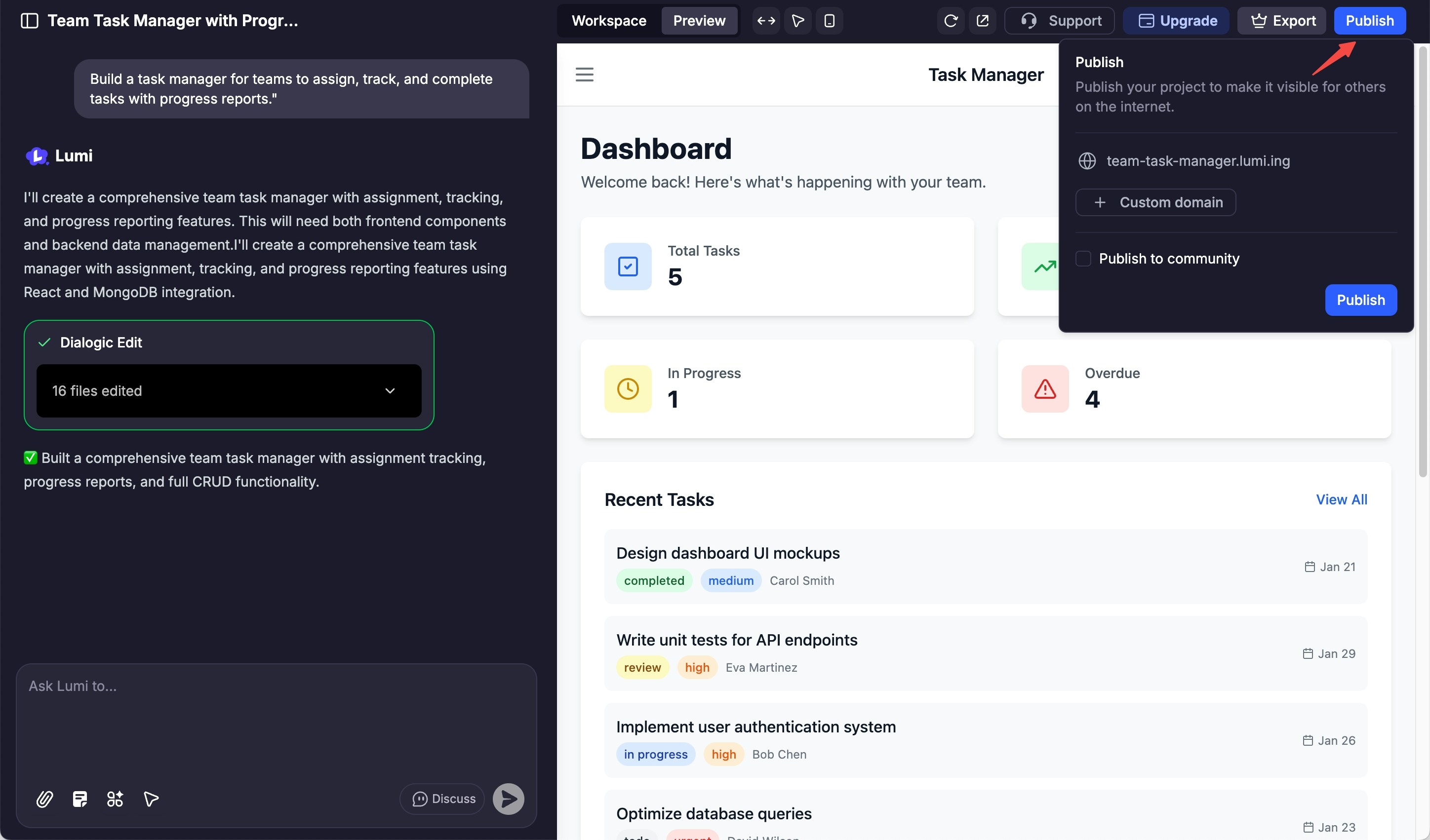
  <Step title="共有と公開">
    公開の準備ができたら、「Publish」ボタンをクリックしてサイトをデプロイし、世界に公開します。
    <img src="https://mintcdn.com/blockdance/yVzLgDWOMQWyvNCE/images/20250911-160827.jpeg?fit=max&auto=format&n=yVzLgDWOMQWyvNCE&q=85&s=7fd2a73b38e219cc8fcfbb818cac7fe7" alt="20250911 160827 Jpe" width="2896" height="1702" data-path="images/20250911-160827.jpeg" />
  </Step>
</Steps>