> ## Documentation Index
> Fetch the complete documentation index at: https://docs.lumi.new/llms.txt
> Use this file to discover all available pages before exploring further.

# 函式

> 利用 Lumi 的後端函式來處理資料、執行業務邏輯並整合外部服務——釋放完整的伺服器端功能和無縫整合。

## 輕鬆建立

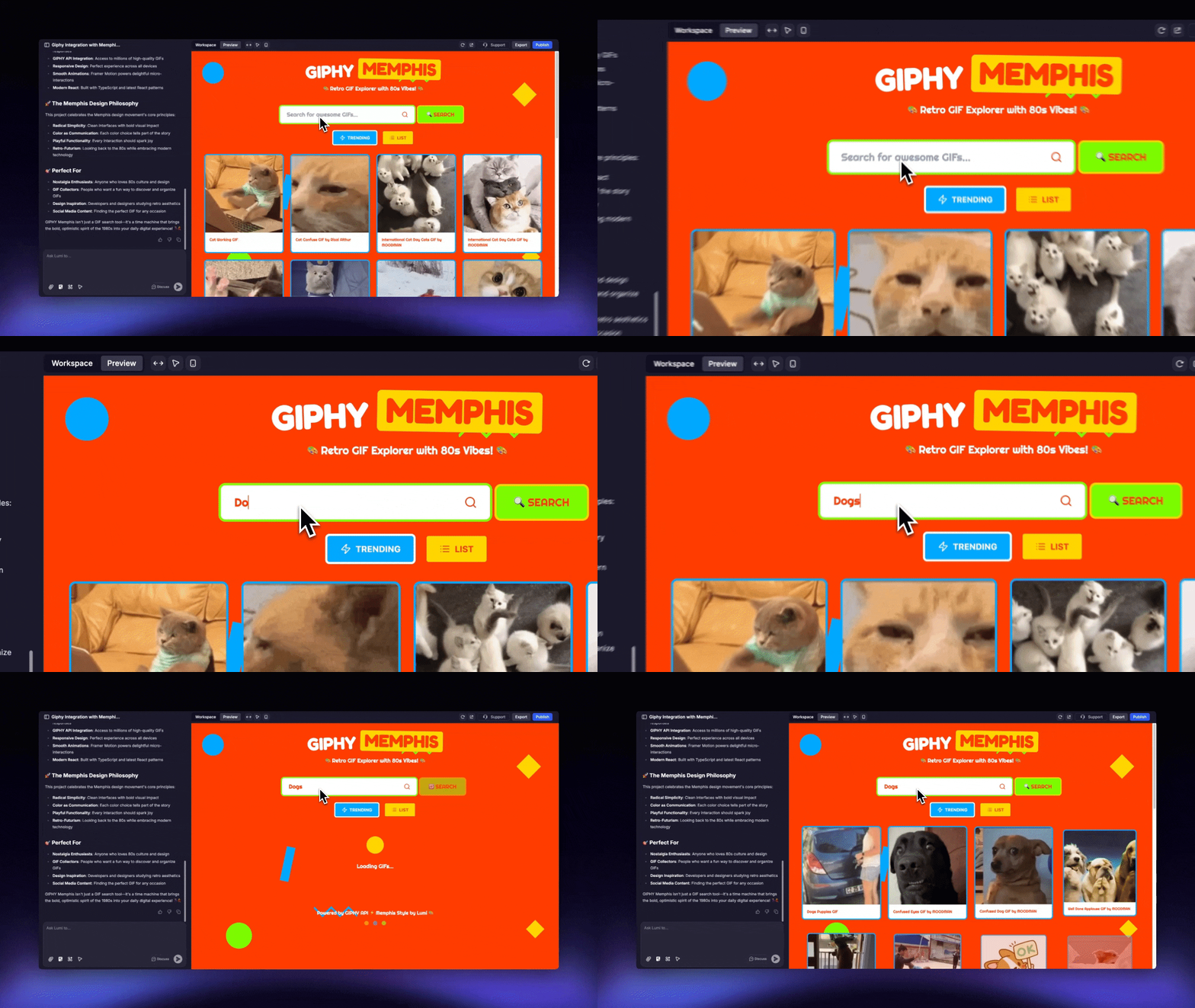
在 Lumi 聊天室中描述函式，即可輕鬆生成。

<img src="https://mintcdn.com/blockdance/Zybg51vOq0ubsckj/images/Area.gif?s=dc86c725539961206058c2d5aef632c7" alt="Area Gi" width="1280" height="720" data-path="images/Area.gif" />

<Steps>
  <Step title="描述函式">
    直接描述您想實現的函式，例如：

    ```mdx theme={null}
    我想建立一個基於 GIPHY 服務的 GIF 分享平台。
    ```
  </Step>

  <Step title="啟用函式">
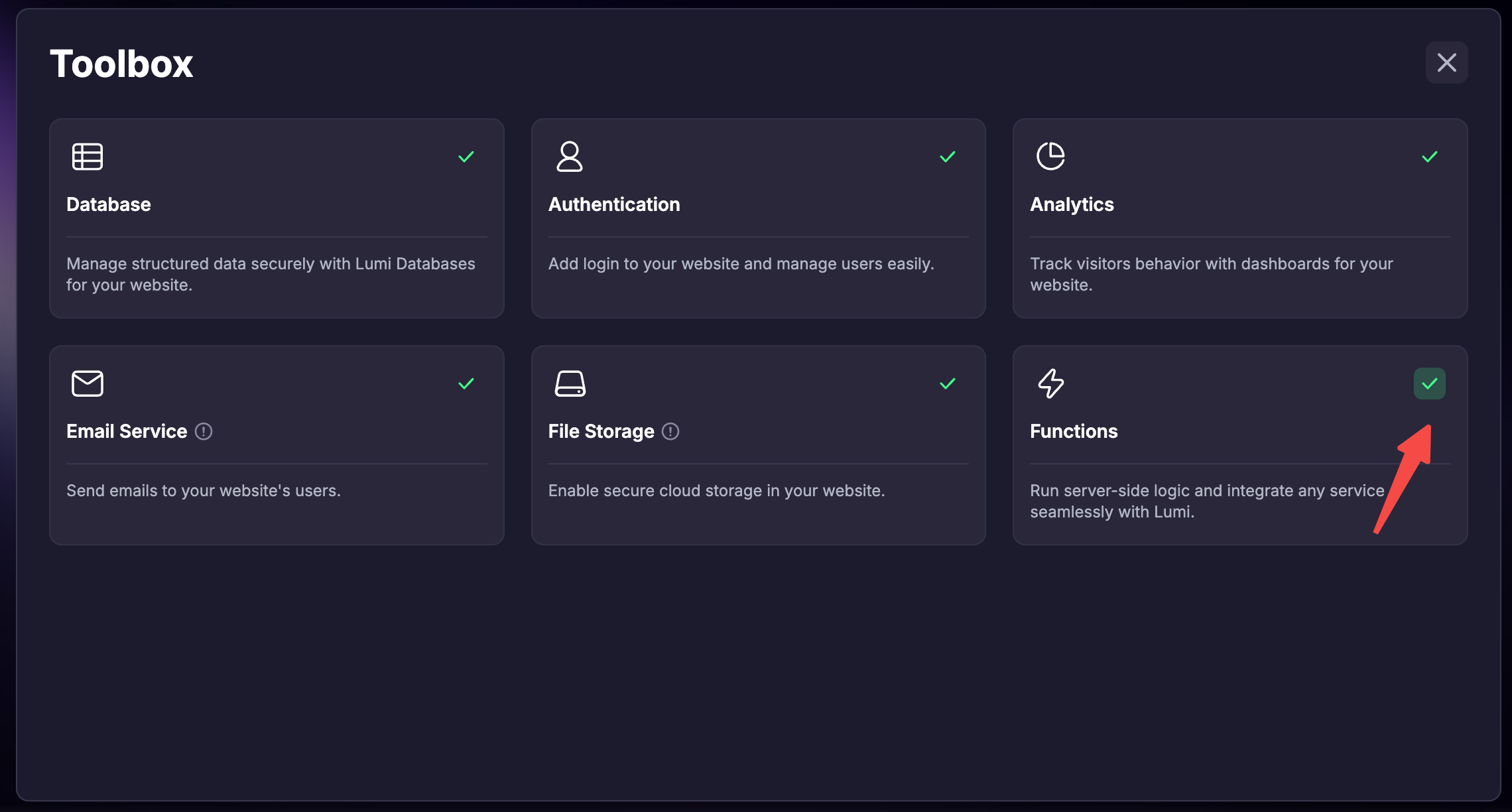
    記得在工具箱中啟用「函式」功能。
  </Step>

  <Step title="讓 Lumi 整合">
    Lumi 接著會自動為您整合第三方服務。
  </Step>

  <Step title="提供 API 金鑰">
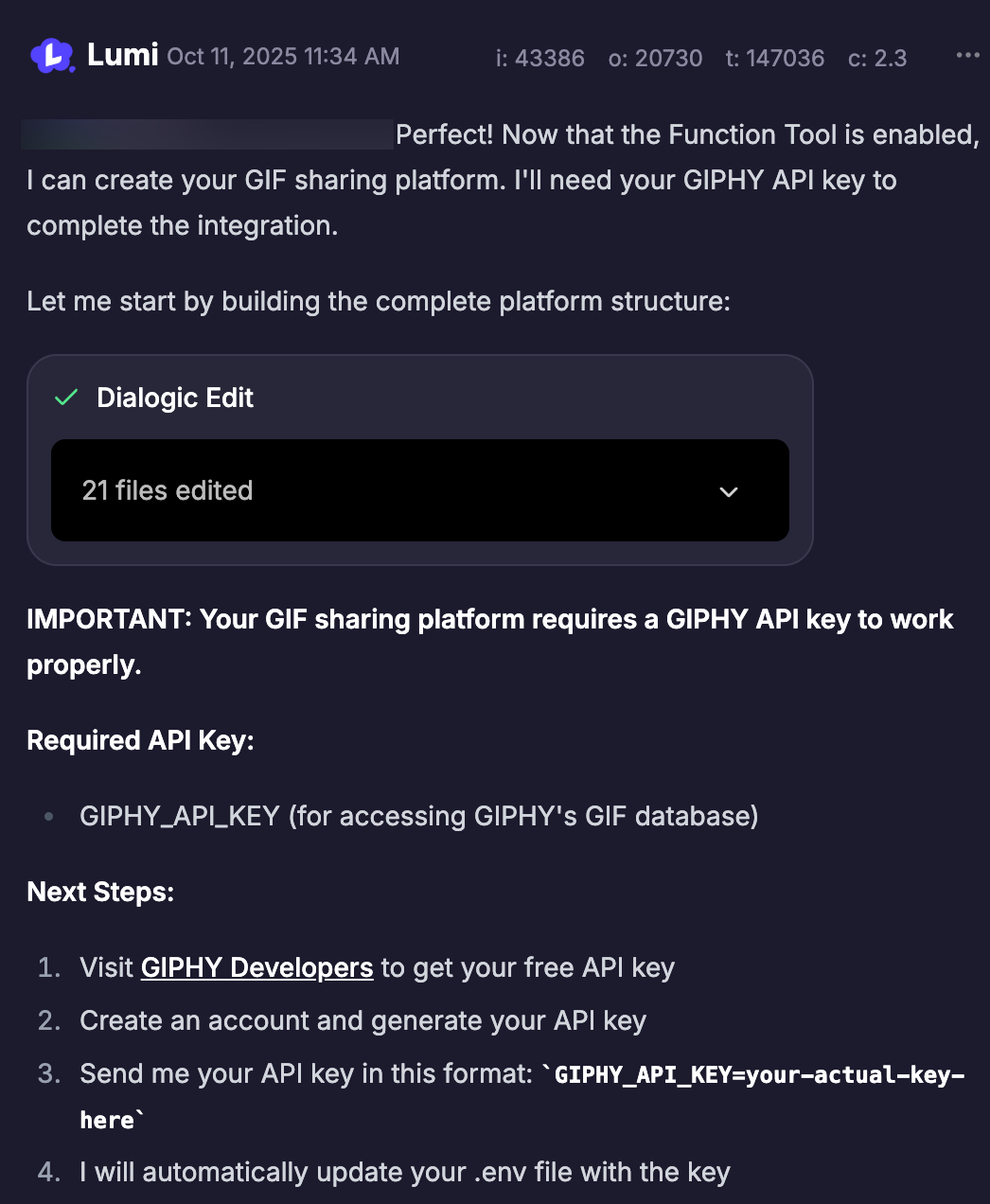
    在過程中出現提示時，於聊天室中傳送所需的 API 金鑰。Lumi 會將其安全地儲存為環境變數，以防外洩。

    <img src="https://mintcdn.com/blockdance/7wv9P8buc22_9riV/images/screenshot-20251011-143703.png?fit=max&auto=format&n=7wv9P8buc22_9riV&q=85&s=454adf0276b5637717f34495bff15ef9" alt="Screenshot 20251011 143703 Pn" width="1046" height="1272" data-path="images/screenshot-20251011-143703.png" />
  </Step>
</Steps>

### 啟用函式

* 在首頁建立新專案時啟用

  <Steps>
    <Step title="點擊輸入框左下角的「工具箱」">
      <img src="https://mintcdn.com/blockdance/Zybg51vOq0ubsckj/images/20251011-143408.jpeg?fit=max&auto=format&n=Zybg51vOq0ubsckj&q=85&s=a9963e3010ed9c1b0b11a494ff418221" alt="20251011 143408 Jpe" width="1836" height="1166" data-path="images/20251011-143408.jpeg" />
    </Step>

    <Step title="勾選「函式」">
      <img src="https://mintcdn.com/blockdance/Bpx0LtV4twXY-mvm/images/screenshot-20251111-181701.png?fit=max&auto=format&n=Bpx0LtV4twXY-mvm&q=85&s=0a0bdeb7de63bc56562c6394745a7a95" alt="Screenshot 20251111 181701 Pn" width="2280" height="1224" data-path="images/screenshot-20251111-181701.png" />
    </Step>

    <Step title="發送訊息並建立專案後，此專案將會啟用函式。" />
  </Steps>

* 在已建立的專案中啟用

  <Steps>
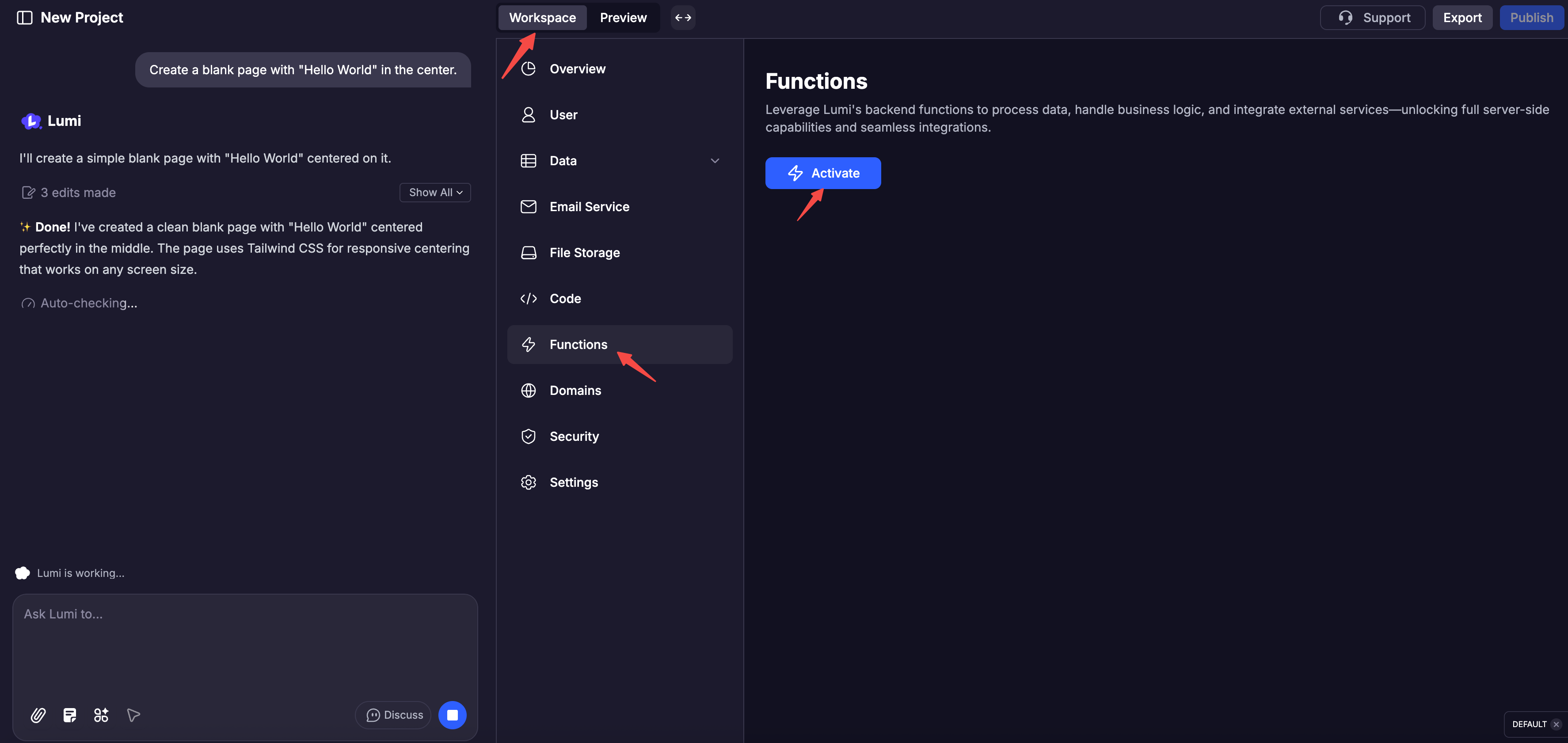
    <Step title="點擊「工作區」" />

    <Step title="點擊下方導覽列中的「函式」" />

    <Step title="點擊「啟用」">
      <img src="https://mintcdn.com/blockdance/Bpx0LtV4twXY-mvm/images/screenshot-20251111-182134.png?fit=max&auto=format&n=Bpx0LtV4twXY-mvm&q=85&s=266232b5a047125e052e41ba263fed99" alt="Screenshot 20251111 182134 Pn" width="3548" height="1682" data-path="images/screenshot-20251111-182134.png" />
    </Step>
  </Steps>

## 內建偵錯功能

每個函式都配備了詳盡的日誌，詳細記錄其執行過程、輸出和錯誤。您也可以查看程式碼並親自手動測試函式。

<Columns cols={2}>
  <Card title="函式程式碼" img="https://mintcdn.com/blockdance/Zybg51vOq0ubsckj/images/20251011-150001.jpeg?fit=max&auto=format&n=Zybg51vOq0ubsckj&q=85&s=e94f3ebd5386a94ad5b1c6efd25e5167" width="3840" height="1916" data-path="images/20251011-150001.jpeg" />

  <Card title="API 文件" img="https://mintcdn.com/blockdance/Zybg51vOq0ubsckj/images/20251011-150010.jpeg?fit=max&auto=format&n=Zybg51vOq0ubsckj&q=85&s=db66ea094c1fe41485af8e02f0daf142" width="3840" height="1916" data-path="images/20251011-150010.jpeg" />

  <Card title="日誌" img="https://mintcdn.com/blockdance/Zybg51vOq0ubsckj/images/20251011-150013.jpeg?fit=max&auto=format&n=Zybg51vOq0ubsckj&q=85&s=d401d705d53c7ad37e5ef98b36b58fe2" width="3840" height="1916" data-path="images/20251011-150013.jpeg" />

  <Card title="測試" img="https://mintcdn.com/blockdance/Zybg51vOq0ubsckj/images/20251011-143143.jpeg?fit=max&auto=format&n=Zybg51vOq0ubsckj&q=85&s=c2f1473cb3c70ffdfd7b5ec7345c2aed" width="3840" height="1916" data-path="images/20251011-143143.jpeg" />
</Columns>